Half Life 2 Booth1.5
Publisher Description
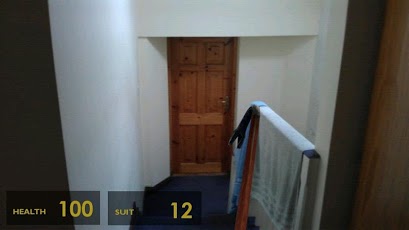
See the world as Gordon Freeman sees it!This app shows the heads-up display of Half Life 2's HEV (Hazardous Environment) suit over a camera view, allowing you to see your health, shields, and trusty crowbar (or other weapon)! Press the camera icon to take a picture of your life as seen by Gordon Freeman! Press the weapon icon to cycle between available weapons: crowbar, gravity gun, pulse rifle, shotgun, pistol, magnum, crossbow, sub-machine gun, or RPG.Want more features, such as different weapons or auxiliary power display? Got any suggestions for changes? Let me know! Use the "Email Developer" button below. Please use the same button to report any bugs or crashes. Negative reviews don't give enough details, and no way for me to get in touch with you. If I can't get in touch, I can't get any more details, and I can't fix it.Photos are stored in the "Pictures" folder on your SD card and will remain even if the app is uninstalled. They can be deleted as normal from the Gallery.Note on Permissions:CAMERA - Needed to access the camera to take pictures.EXTERNAL STORAGE - Needed to save the photos on your SD card.INTERNET - Needed for ads.NETWORK STATE - Needed for ads. Keywords:computer video games half life 2 gordon freeman valve steam team fortress first person shooter episode 1 2 3 portal borealis orange box crowbar gravity gun pulse rifle shotgun
About Half Life 2 Booth
The company that develops Half Life 2 Booth is One I Made Earlier. The latest version released by its developer is 1.5. This app was rated by 1 users of our site and has an average rating of 5.0.
To install Half Life 2 Booth on your Android device, just click the green Continue To App button above to start the installation process. The app is listed on our website since 2012-07-18 and was downloaded 14 times. We have already checked if the download link is safe, however for your own protection we recommend that you scan the downloaded app with your antivirus. Your antivirus may detect the Half Life 2 Booth as malware as malware if the download link to com.hl2.hud is broken.
How to install Half Life 2 Booth on your Android device:
- Click on the Continue To App button on our website. This will redirect you to Google Play.
- Once the Half Life 2 Booth is shown in the Google Play listing of your Android device, you can start its download and installation. Tap on the Install button located below the search bar and to the right of the app icon.
- A pop-up window with the permissions required by Half Life 2 Booth will be shown. Click on Accept to continue the process.
- Half Life 2 Booth will be downloaded onto your device, displaying a progress. Once the download completes, the installation will start and you'll get a notification after the installation is finished.
Program Details
System requirements
Download information
Pricing
Version History
version 1.5
posted on 2012-07-18
version 1.5
posted on 2012-07-18
Several fixes and updates
